
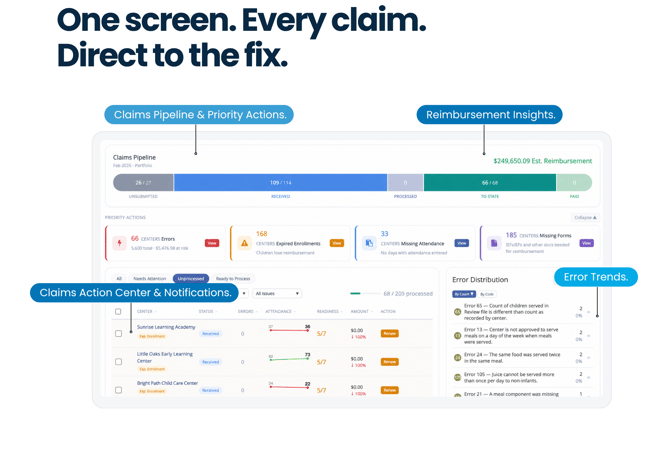
How Beacon Verify Centralizes Your Monthly Claims Processes
Beacon Verify is a command center for managing CACFP claims across your network of centers. Rather than navigating to each center individually, this dashboard shows claim status, errors, readiness, and estimated reimbursement for your entire organization — all in one place.
Beacon Verify comes with two views, allowing you to drill-down to the smallest details and review high-level metrics in one place.
- My Portfolio — A claims manager's working view. Displays the full site table with tools for filtering, sorting, taking action, and sending notifications.
- Executive — An organization-level summary for leadership, with KPI cards, trend charts, and revenue opportunity alerts.
Enable Beacon Verify for Your Account
To begin using Beacon Verify, you must first enable it for your account in your account Settings:
- From the menu to the left, click
 . The Settings page opens.
 - Click
 next to Do you want to enable the Beacon Dashboard?. Your changes are automatically saved, and, when the page reloads, you should see Beacon Verify in your left-hand menu.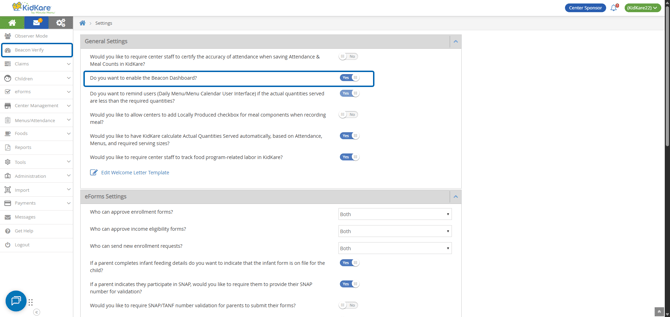
Note: Once you enable Beacon Verify for your account, it will become your default Home page instead of Observer Mode, allowing you to get right to your organization's claims data.
(Optional) Assign Claims Processing Staff to Centers
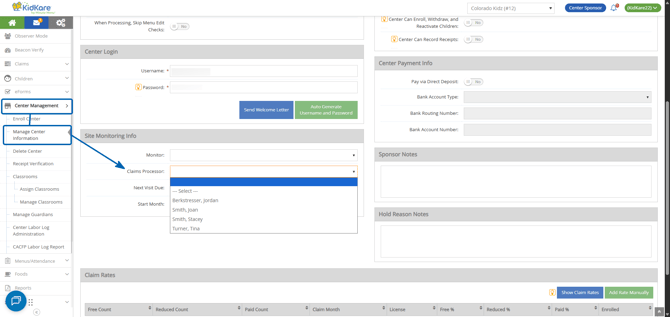
The Portfolio View, by default, displays all site data for users. If you wish to limit which sites your claims processing staff can view and work with in Portfolio, you can assign Claims Processors directly on the Manage Center Information Oversight tab (similar to how you assign Monitors for Reviews).
What about Monitors?
If you, instead, prefer to use Beacon Verify for your Monitors to prepare for reviews and wish to limit their Portfolio view to their assigned sites, simply assign the Monitor in the Claims Processor drop-down—even if they are already selected in the Monitor field.
Set Permissions for Beacon Verify
You can determine which of your sponsor staff can see Beacon Verify, which parts they see, and whether they are limited to their own caseloads by adjusting their user permissions.
- From the menu to the left, click Tools.
- Click Sponsor User Permissions.
- Select the user to edit.
- In the Beacon Verify section, choose the level of access to grant to Beacon Verify.
- View Beacon Portfolio Dashboard
- View Beacon Executive Dashboard
- Limit to Caseload Only
- When finished, click Save.
Four Common Permissions Setups
The following table provides example permissions combinations to satisfy common access concerns.
| Who | Settings | What This Does |
| Leadership |
YES: Portfolio + Executive View |
Full access to Beacon Verify without caseload limits. Allows filtering by assigned Monitor staff. |
| Claims Staff |
YES: Portfolio NO: Executive View + Limit to Caseload Only |
Full access to the Portfolio view only without caseload limits. Allows filtering by assigned Monitor staff. No access to the Executive view. |
| Monitors |
YES: Portfolio + Limit to Caseload Only NO: Executive View |
Access to the Portfolio view limited to assigned providers. No filtering off other caseloads. No access to the Executive view. |
| Others | NO: Portfolio; Executive; Limit to Caseload Only | Cannot access Beacon Verify at all. Home page directs to Observer Mode page instead. |