
On May 8, 2026, the USDA published its Final Rule Expanding Fluid Milk Options in Child Nutrition Programs (CNPs). The rule took effect on June 8, 2026. It allows whole and reduced-fat (2%) milk to be offered to participants ages two (2) and up in the CACFP, National School Lunch Program (NSLP), School Breakfast Program (SBP), and Special Milk Program (SMP).
| Age Group | Whole | Red. Fat (2%) | Low-Fat (1%) | Fat-Free (Skim) | Flavored |
| 1 year | ✅ | ❌ | ❌ | ❌ | ❌ |
| 2-5 years | ✅ | ✅ | ✅ | ✅ | ❌ |
| 6-18 years | ✅ | ✅ | ✅ | ✅ | ✅ |
| Adults | ✅ | ✅ | ✅ | ✅ | ✅ |
Note: Per the USDA Final Rule, program operators are not required to offer the new milk options. You choose whether to use them and when to start. Follow all federal and state guidance when you put the new options in place.
Milk Policies in KidKare
KidKare has three policies for the expanded milk options. All three are under M. Menus. Each one defaults to N, and each can be set for all states or by state if you operate in more than one state. For more information, see Manage Policies.
| Policy | What it does | When it applies |
|---|---|---|
| M.21 Use Expanded CACFP Milk Options | Sites record the milk fat type served to each age group on the Daily Menu. The milk audit checks each fat type separately. | Menus dated June 8, 2026 or later |
| M.21a Milk Distribution Priority | The milk audit lets any purchased milk cover the need for ages 2 and older. Requires M.21 = Y. | Claim months October 2026 or later |
| M.21b Use Simplified Milk Entry on the Daily Menu | Two toggles replace the fat type matrix on the Daily Menu. Requires M.21 and M.21a = Y. | Menus dated October 1, 2026 or later |
You can use M.21 alone, M.21 with M.21a, or all three. M.21b has no effect unless M.21a is also set to Y.
IMPORTANT! These updates are available only in KidKare. They are not in the deprecated CX desktop application or the CX Web receipt tool. Claims processed in CX use the updated milk logic (M.21 and M.21a), but all menus, milk audits, and receipts must be managed in KidKare to stay accurate.
M.21: Expanded Milk Options
When M.21 is set to Y, the Daily Menu displays a milk matrix once a milk is selected. Your sites (and you) select the fat type served to each age group at that meal.
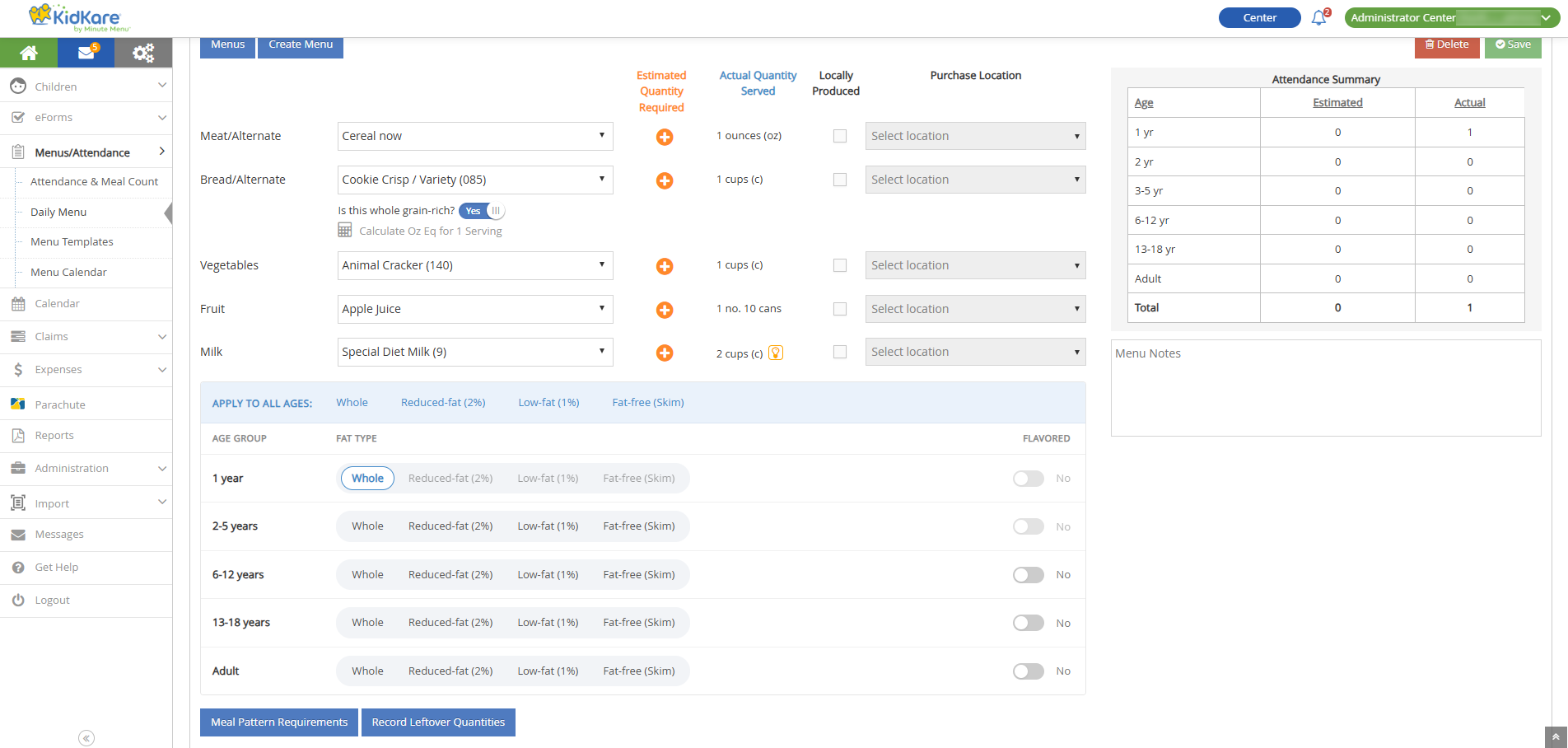
M.21 also updates the following areas:
- Receipts: Itemized Entry and Quick Entry include the new milk types. Parachute does too, for centers that use Parachute for receipt entry.
- Milk Audit: The Milk Audit tracks each milk type from menus, tracked quantities, and receipts.
- Copy Menu and Master Menus: Copying a menu and applying a Master Menu carry the milk fat types.
- Claim errors: Three claim errors were added for the new milk options. Error 78 also checks the new milk types.
- Error 117: Milk Served is Missing a Fat-Content Subcategory
- Error 118: Whole Milk Required for 1-year Old
- Error 119: Flavored Milk Served to Ages 1-5
- Reports: The following reports include the new milk types:
- Menu Production Record
- Weekly Quantities Required
- Office Error Report
- Milk Audit Daily Report
- Milk Audit Monthly Report
- Receipt List Export
- Center Receipts Journal
- Monthly Receipt Totals
- Expenditure Worksheet
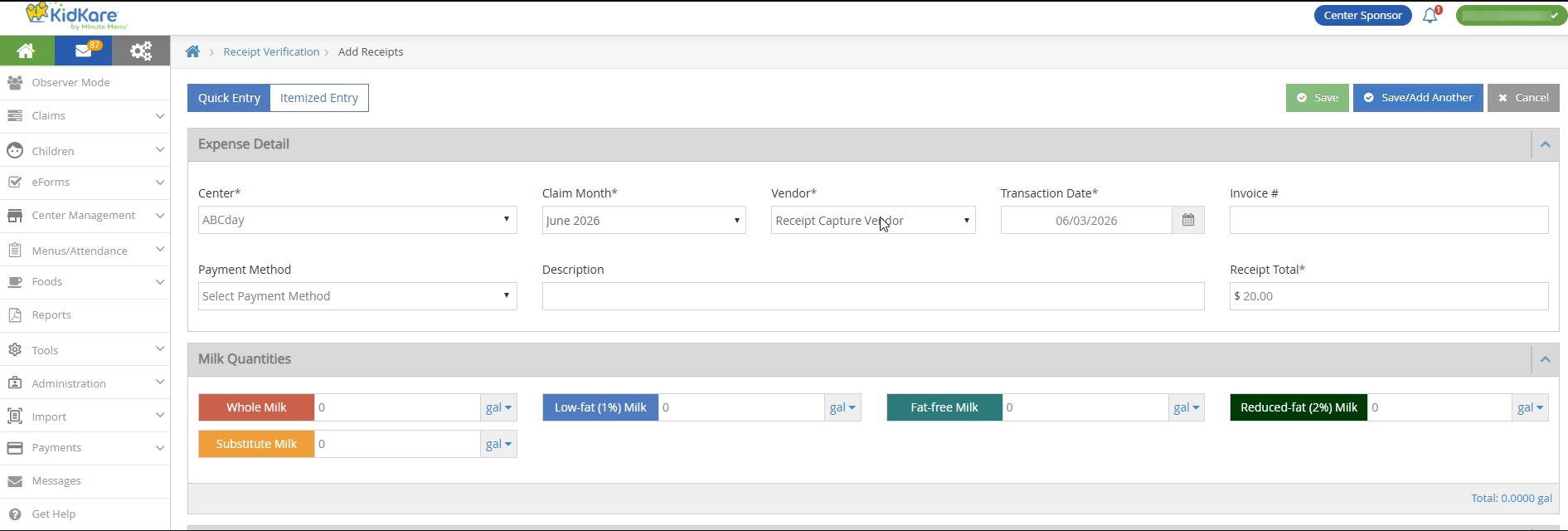
M.21a: Milk Distribution Priority
With M.21 alone, the milk audit checks each fat type separately. A center can have extra 2% milk on hand and still be short on 1% milk in the same month, even though children ages 2 and older can drink any of the four types.
When M.21a is set to Y, the milk audit uses purchased milk in this order:
- Whole milk covers 1-year-olds first.
- Any whole milk left over goes to ages 2 and older.
- Fat-free milk goes to ages 2 and older.
- Low-fat (1%) milk goes to ages 2 and older.
- Reduced-fat (2%) milk goes to ages 2 and older.
A shortage for ages 2 and older is found only when all of this milk together cannot cover the need.
IMPORTANT! Only whole milk can cover 1-year-olds. Fat-free, 1%, and 2% milk never cover a 1-year-old shortage. Substitute milk is not combined with the other milk types. It keeps its own audit, as before. Parent-provided milk is not audited.
The October 1, 2026 Start Date
M.21a applies to claim months October 2026 and later, for every sponsor. The start date does not depend on the day you set M.21a to Y.
- Claim months before October 2026 always use the separate fat type audit.
- An October 2026 or later month uses M.21a whenever it is processed or reprocessed while M.21a is set to Y, even if it was first processed before you turned M.21a on.
- November 2026 is the first month whose starting balance is carried over under M.21a. October's starting balance comes from September, which used the separate fat type audit.
What You See When M.21a Is On
Note: For centers with only an Open Enrollment license, the Daily Menu and Milk Audit screens do not change. Their milk is still distributed under M.21a when the claim is processed.
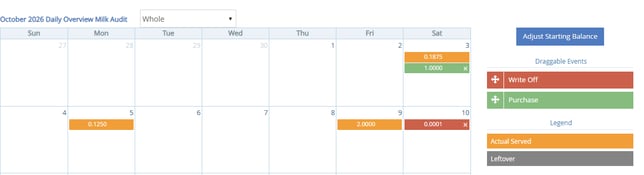
- Milk Audit: The screen has two tabs, Milk Distribution and Substitute. The Monthly view shows milk available by fat type, and milk required and used by Age 1 year and Ages 2 and older. The Daily view lets you select an age group or a single milk type.
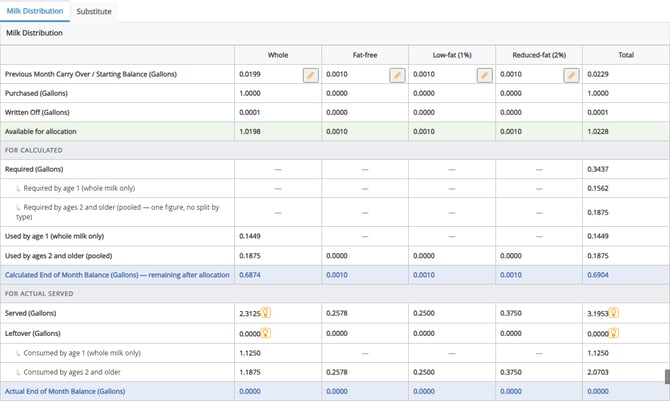
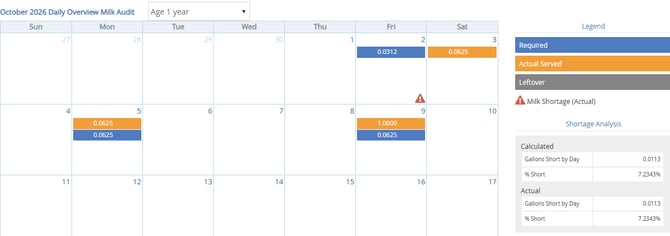
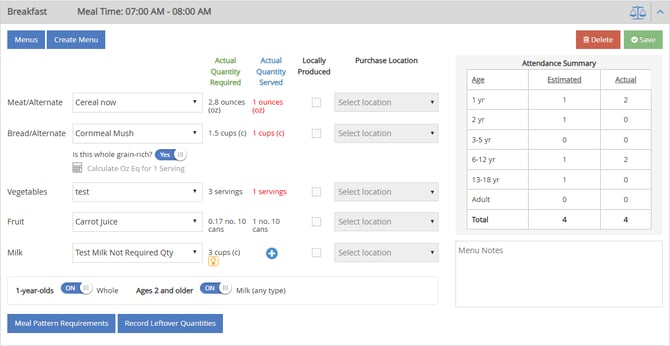
- Enter Actual Quantities Served: When Policy M.01 (Record Quantities Served - Non-Infants) is set to Y, whole milk is entered in two rows, Whole Milk - 1 year and Whole Milk - 2 years and older. Total Whole Milk shows the sum. Other milk types are entered as before. For a menu recorded before this split existed, the two rows show 0. Enter the split before you save.
- Error 87: Shortage lines name the age group instead of a fat type: For 1-year-olds (Whole) and For ages 2+. A shortage for ages 2 and older can disallow meals for any child age 2 or older.
- Error 78: Milk served is checked by age group. Whole milk served to 1-year-olds is compared with what 1-year-olds required. All other milk served is compared with what ages 2 and older required.
- Milk Audit reports: The Milk Audit Summary and the Milk Audit Report show a Supply section by fat type, a Distribution section by age group, and a Substitute section.
Your other milk audit policies still apply. Under Policy M.06f (Milk Audit Shortage Disallowance Type) set to Specific Meals, or Policy M.06e (Milk Audit Determination of Shortage) set to Running Total Each Day, milk is counted day by day. Milk bought later in the month does not cover an earlier day that was already short.
Note: When Policy M.06m (Do not disallow meals for 1 year-olds in the event of a milk shortage) is set to Y, no 1-year-old meals are disallowed for a milk audit shortage. Under M.21a, a whole milk shortage for 1-year-olds is the only shortage that the other milk types cannot cover. A center with M.06m set to Y may see no milk audit disallowance at all. The Office Error Report shows the 1-year-old shortage as an advisory line. Errors 78 and 117 can still disallow 1-year-old meals.
M.21b: Simplified Milk Entry on the Daily Menu
When M.21, M.21a, and M.21b are all set to Y, meals dated October 1, 2026 or later no longer show the fat type matrix. Once a milk is selected, one line appears under it with two toggles:
- 1-year-olds: Whole
- Ages 2 and older: Milk (any type)
Both toggles start on for a new meal. Click  next to an age group to turn it off if that age group was not served milk at the meal. At least one toggle must be on to save the meal.
- Error 117: If children in an age group attended the meal and that age group's toggle is off, Error 117 disallows that age group.
- Receipts and actual quantities: Receipts and Enter Actual Quantities Served still record milk by type.
- Menu reports: The Menu Production Record and Weekly Quantities Required show two milk lines, Whole Milk (1 yr) and Milk (2+ yrs), for menus dated October 1, 2026 or later.
- Master Menus: If you operate in more than one state, the Master Menu shows the toggles when at least one of your states has M.21, M.21a, and M.21b set to Y. When that Master Menu is applied to a center in a state where M.21b is N, the center's matrix shows Whole for every age group. The center updates its Daily Menu if it served a different type.
- Center Review: In the CX desktop application, Center Review follows M.21b. Milk inventory on hand still shows each fat type.
A menu saved with the matrix before M.21b was turned on opens with the toggles set from the fat types already selected. The milk required for that meal does not change unless the menu is saved again. When it is saved, milk is required for every child age 2 or older who attended.
Implementing Milk Distribution (M.21a + M.21b)
We recommend the following process for implementing Milk Distribution and Simplified Milk Entry (note that you can enable Milk Distribution on its own).
- Turn on M.21a and M.21b at the start of a month. Sites then use the toggles for the whole month they are recording.
- You do not need to finish processing older months first. Any October 2026 or later month processed after you turn on M.21a uses the new milk distribution, whether sites recorded it with the matrix or the toggles. Sites do not need to re-enter those menus.
- Do not turn the policies off to process an older month the old way. While they are off, menus recorded with the toggles show Whole for every age group, and every site's Daily Menu returns to the matrix.
- Tell your sites not to re-save menus from months you have already marked for processing. Saving a menu changes its milk entry to the current form.
- Reprocess a claim to see the effect of a policy change. Changing a policy does not change a claim that was already processed.
- Train your sites on the toggles before the month starts. The toggles both default to on when a milk is selected, and they copy from save mater menus, so it's important that sites know they do not need to change them unless they don't have 1 year-olds or ages 2+ in attendance.
If You Have Not Turned On M.21
Before you turn on M.21, we recommend that your team:
- Decide whether your organization will allow the expanded milk options.
- Choose when your centers should begin using them.
- Help centers move to KidKare if they are still using Minute Menu CX.
- Train centers on recording milk on the Daily Menu.
- Set M.21 to Y in KidKare when your team is ready.
M.21 applies only to menus dated June 8, 2026 or later. It does not affect claims for May 2026 or earlier.
IMPORTANT! Once M.21 is set to Y, any June 2026 or later claim you process uses the updated milk rules. If centers entered menus for those months without milk fat types, those meals may get Error 117. Plan when you turn on M.21 around the claim months you still have to process.