
Note: You must at least have View Center Labor Logs to view Center Labor Log Administration.
Once center admins approve their staff labor logs, those logs become available for sponsor review. This is meant to be the final check before claims are processed and submitted to the state.
-
From the menu to the left, click Center Management.
- Select Center Labor Log Administration. The Center Labor Log Administration page opens.
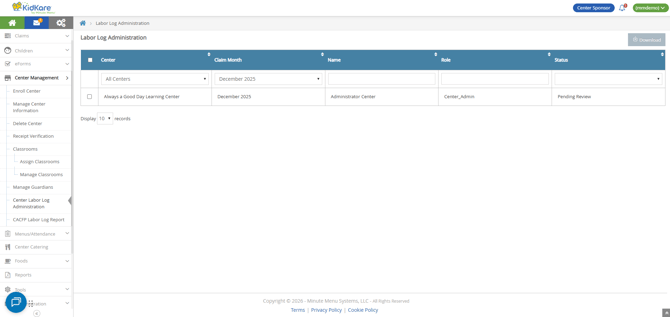
- Use the following boxes to filter the displayed labor logs:
- Center: Select one or more centers to display. You can also choose All Centers.
- Claim Month: Select one or more claim month to include.
- Name: Begin typing the center staff member's name to filter by name.
- Role: Begin typing the role name to filter by role.
- Status: Choose to filter by Pending Review, Reviewed, or both.
- Click each column header to sort the displayed logs in ascending or descending order.
- To review center labor logs:
- Click the row to review. The employee labor log opens.
- Review the recorded activities for accuracy.
- To make changes, click Edit. Make edits, as needed. Click Save to save your changes.
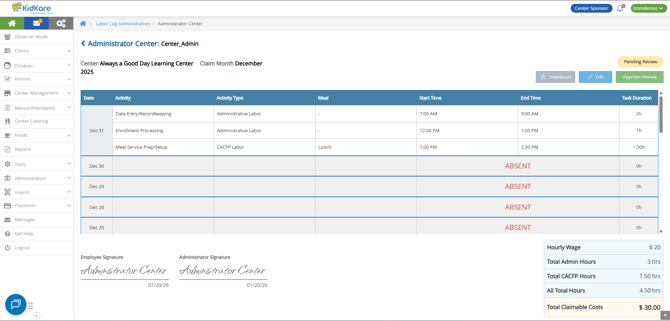
- When finished, click Approve Review to move the log status to Reviewed.
- Click Download to download the individual labor log.
- To export center labor logs to Excel:
- Check the box next to each log to export.
- Click Download.
Why can't I see the CACFP Claimable Costs?
To protect sensitive information, such as an employee's hourly wages, users must be granted the View/Manage Labor Details permission to see any wage-related information—including totals on individual labor logs and the CACFP Labor Log Report.
This permission impacts both the Labor Log as viewed in KidKare and the Excel® download.