-
Blank Child Enrollment - This prints a blank enrollment form that you can give to guardians to manually complete. Spanish version available in some cases. Note that this report may look different depending on which state you are in.
-
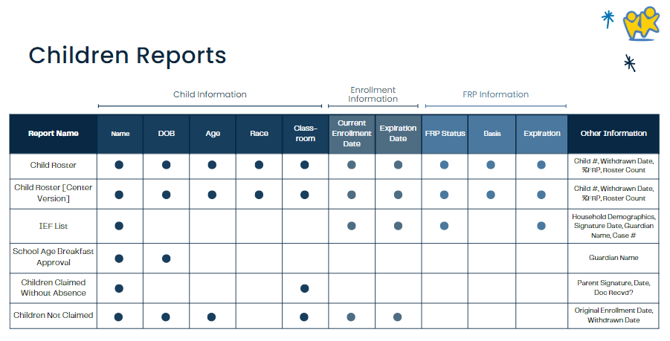
Children not Claimed - This report lists any enrolled children who were not claimed for the selected month.
-
Child Roster - This report lists all children enrolled during the select month. It includes FRP counts and percentages, FRP basis, as well as basic demographic information and enrollment dates for the listed children.
-
Child Racial Counts Summary - This report provides a count of children broken down by race and ethnicity based on the month selected.
Sample Report -
Child IEF/Child Enrollment report (for completion by parent) - This report prints enrollment and/or income eligibility forms for selected children. You can choose one child or multiple children. Note that this report will pull these forms with all of the data completed based on what is in KidKare now. The parent should only have to update the forms for any changes and add their signature.
-
Verify FRP Consistent Within Family - This report lists the children in each household where the children do not all have the same FRP category. Use this report to verify that everyone in the same household has the same FRP, or to look for any enrollment errors within a household. The report shows each child's status (Enrolled or Withdrawn) and FRP Eligibility Basis.
To include recently withdrawn children, check Include Withdrawn Siblings. The Withdrawn On or After box displays, set to one year before today. You can change it to any past date. A withdrawn child who has at least one enrolled sibling, and who withdrew on or after that date, is compared with the rest of the family and listed with it. This option is cleared each time you open the report.
Note: The FRP Eligibility Basis is shown for review only. Children who have the same FRP category but qualify on different bases (for example, Free by SNAP and Free by income) are not flagged.
Sample Report -
School Age Breakfast Approval - This is a printout the center can use to have parents sign allowing any school-ages children to be served breakfast.
-
Child List Export - This is a customizable report option. Use the filters to narrow down which children you want on the report, as well as which fields you want to see on the report. This report will always export in an excel/csv format. Examples of reports you can pull from here: Participant Birthday List, Participant Allergies & Conditions, All Participants withdrawn between mm/dd/yyyy and mm/dd/yyyy, etc.
-
Children Claimed Without Absence - This reports lists children that were claimed for the selected time frame without any absences within that time frame.
English
![KK Icon.png]](https://knowledge.kidkare.com/hs-fs/hubfs/KK%20Icon.png?width=40&height=40&name=KK%20Icon.png)