![logoiconparachute.png]](https://knowledge.kidkare.com/hs-fs/hubfs/logoiconparachute.png?height=40&name=logoiconparachute.png)
The Account Statement report lists all invoices and payments within a selected time
frame.
frame.
- From the menu to the left, click Reports.
- Click the Select a Category drop-down menu and select Accounting Reports.
- Click the Select a Report drop-down menu and select Statement of Account.
- Click the All Payers drop-down menu and select the Payer to include in this report.
- Click the Date Range drop-down menu and select the time frame for which to print the report. You can also set a custom date range in the From and To boxes.
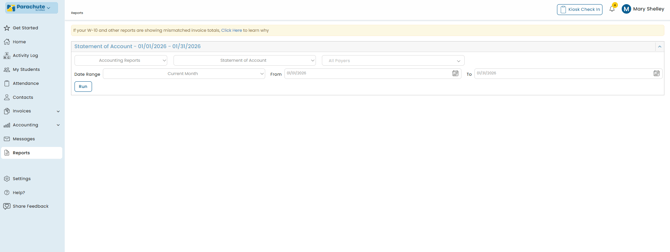
- Click Run. The report displays.
- To print it, click Print. Your browser's printer options display.
- Adjust your printer settings, as needed, and click Print.
Note: If you are printing this report, click  to collapse the report header. This saves space on your printed report.